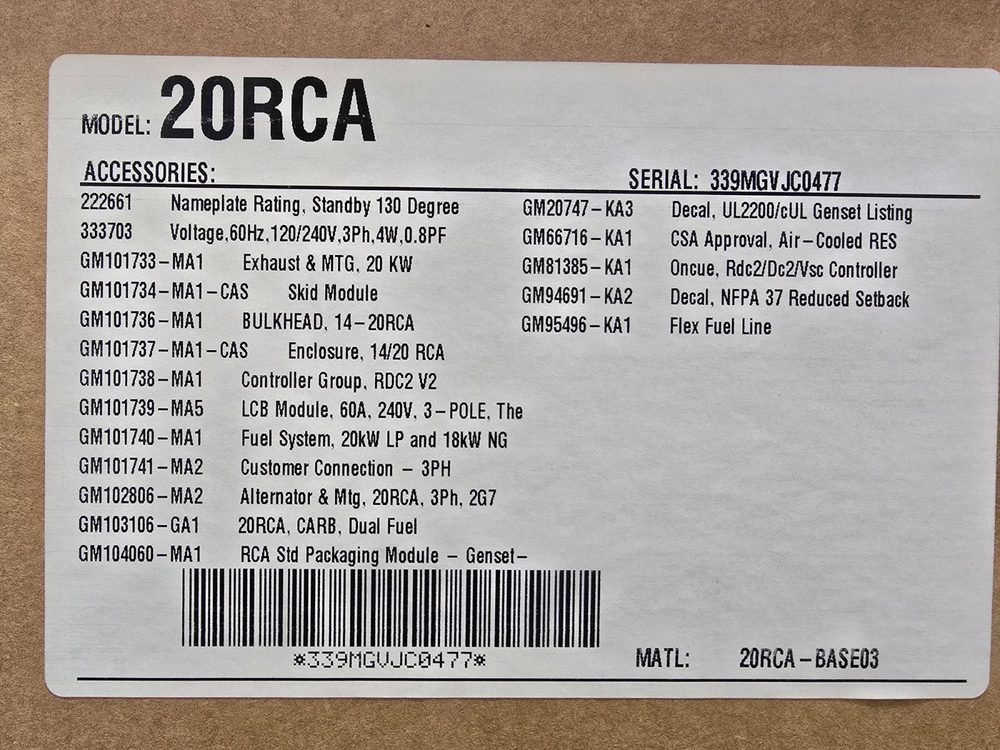
Service parts for the 20RCA
Grouped by system, with how many of each the parts manual calls for.
Oil system
1 requiredPrices captured from merchant listings; some links are affiliate links. Confirm against your serial number before ordering.
Specifications
| Fuel | Natural gas or LPG (propane), field-convertible |
|---|---|
| Frequency | 60.0 Hz |
| Standby power | 20 kW |
| Standby kVA | 20 |
| Emissions | EPA emergency standby for backup of a reliable utility source (CARB/EPA emission compliance categories per certification label) |
| Controller | RDC2 |
| Oil capacity | 1.9 L |
| Alternator | PowerBoost™ |
| Voltage options | 12 V |
| Phase | 1 |
| Rated current | 75 A |
| Power factor | 1 |
| Circuit breaker | 20 A |
| Battery group | 51 |
| Battery cranking | 500 (at 0°F) CCA |
| Battery voltage | 12 V |
| Battery quantity | 1 |
| Dimensions (L×W×H) | 1193×666×817 mm |
| Dry weight | 252 kg |
| Sound level | 64.0 dBA @ 7 m |
Engine
| Oil capacity | 1.9 L |
|---|---|
| Coolant capacity | 2.5 L |
| Displacement | 0.999 L |
| Aspiration | air-cooled, four-cycle, twin cylinder, overhead valve, with oil cooler |
| Rated speed | 3600 rpm |
Maintenance & consumables
for the Kohler CH1000| Item | Spec | Capacity | Part # | Interval | |
|---|---|---|---|---|---|
| Air filter | Dry | — | 300 hr | ||
| Fuel filter | — | 200 hr | |||
| Oil filter | Cartridge | ×1 | 52 050 02-S | 200 hr | Amazon $22.70 eBay |
| Battery | Ground Negative 12V (DC) | — | 200 hr | ||
| Belt | — | 200 hr | |||
| Coolant | 2.5 L | — | 200 hr | ||
| Coolant filter | — | 150 hr | |||
| Oil | 500.0 L | — | 200 hr | ||
| Spark plug | — | 300 hr |
Service intervals
40| Item | Action | Hours | Months | Notes |
|---|---|---|---|---|
| Oil level | Check | 8 hr | Every 8 hours of engine operation | |
| Oil level, 14 kW models | Check | 8 hr | Every 8 hours of engine operation | |
| Oil level, 18/20 kW models | Check | 8 hr | Every 8 hours of engine operation | |
| Oil level, 20 kW models | Check | 8 hr | ||
| Oil level, 26 kW models | Check | 24 hr | ||
| Change oil (14 kW models) | Change | 100 hr | 12 mo | Yearly or 100 hours |
| Change oil (20 kW models) | Change | 150 hr | 12 mo | Yearly or 150 hours |
| Oil cooler (20RCA/RCAL only) | Clean | 150 hr | 12 mo | Yearly or 150 hours; inspect and clean, must be kept free of debris |
| Replace oil filter (20 kW models) | Replace | 150 hr | 12 mo | Yearly or 150 hours |
| Replace oil filter (14 kW models) | Replace | 200 hr | 12 mo | Yearly or 200 hours |
| Air cleaner service | Clean | 300 hr | 12 mo | Yearly or 150/300 hours depending on model; more often under dusty/dirty conditions |
| Brushes and collector ring | Inspect | 300 hr | 12 mo | Yearly or 300 hours; authorized distributor/dealer only |
| Spark plugs | Replace | 300 hr | 14 kW: 300 hours; 20 kW: 150-300 hours | |
| Crankcase breather hose | Replace | 500 hr | 12 mo | Yearly or 500 hours |
| Replace stepper motor coupling and bushing | Replace | 500 hr | Authorized distributor/dealer only | |
| Wire-cable insulation condition | Inspect | 500 hr | 36 mo | 3 years or 500 hours |
| Wire-cable insulation condition | Test | 500 hr | 36 mo | 3 years or 500 hours |
| AC electrical system visible wear or damage | Inspect | 3 mo | Quarterly | |
| Air ducts, louvers | Clean | 12 mo | Yearly; visually inspect and clean | |
| Battery and rack corrosion | Clean | 12 mo | Yearly | |
| Battery charger operation, charge rate | Check | 1 mo | Monthly | |
| Battery electrolyte level and specific gravity | Check | 12 mo | Yearly; not necessary for maintenance-free batteries | |
| Battery terminals and boots | Clean | 12 mo | Yearly | |
| Clean and tighten battery terminals and inspect boots | Clean | 12 mo | Yearly | |
| Control and power wiring connections | Check | 12 mo | Tighten; Yearly | |
| Exhaust insulation, fire hazards | Inspect | 12 mo | Yearly | |
| Flexible fuel lines and connections | Inspect | 3 mo | Replace as necessary; Quarterly | |
| Fuel flexible lines and connections | Inspect | 3 mo | Visually inspect; replace as necessary; quarterly | |
| Fuel piping | Inspect | 12 mo | Yearly | |
| Generator visible wear or damage | Inspect | 3 mo | Quarterly | |
| Generator, visible wear or damage | Inspect | 3 mo | Quarterly | |
| Insulation resistance test of windings (Megger) | Test | 36 mo | 3 years; authorized distributor/dealer only; SCR/rectifier and load leads disconnected | |
| Interior of sound enclosure | Clean | 3 mo | Quarterly | |
| Remote control system (if equipped) | Check | 1 mo | Monthly | |
| Remote control system, if equipped | Test | 1 mo | Monthly | |
| Remove corrosion, clean and dry battery and rack | Clean | 12 mo | Yearly | |
| Tighten control and power wiring connections | Adjust | 12 mo | Yearly | |
| Winding insulation resistance readings (Megger) | Test | 36 mo | Authorized dealer only, SCR assembly/rectifier and load leads disconnected; 3 years | |
| Wire abrasions where subject to motion | Check | 6 mo | 6 months | |
| Wire abrasions where subject to motion | Inspect | 6 mo | Six months |
Extracted from the manufacturer documentation linked to this model. Values are copied as printed; confirm against your unit's manual and serial number.
Service specifications
30| Type | Item | Value | Unit | Condition |
|---|---|---|---|---|
| Gap | Spark plug gap | 0.76 | mm (0.030 in.) | |
| Other | Battery wrap length | 1067 (42) | mm (in.) | |
| Other | Battery wrap length | 864 (34) | mm (in.) | |
| Other | Engine cooldown time delay | 5 | minutes | |
| Other | Engine start crank cycle | 3 attempts, 15 sec crank / 15 sec off | ||
| Other | Governed frequency high shutdown | 110 | % of frequency setpoint for >10 sec | 10 sec inhibit after engine start |
| Other | Governed frequency low shutdown | 90 | % of frequency setpoint for >10 sec, or 1 Hz below setpoint for >60 sec | 10 sec inhibit after engine start |
| Other | Heater wrap rating | 50 | Watts | |
| Other | Heater wrap rating | 65 | Watts | |
| Other | Plug cord length | 75 (3) | mm (in.) | |
| Other | Power cord length | 1677 (66) | mm (in.) | |
| Other | Power cord length | 1830 (72) | mm (in.) | |
| Other | Power cord length | 483 (19) | mm (in.) | |
| Pressure | LPG fuel supply | 1.7-2.7 | kPa | |
| Pressure | Natural gas fuel supply | 0.9-2.7 | kPa | |
| Speed | Engine overspeed shutdown | 115 | % of normal running speed for >0.3 sec | |
| Speed | Engine speed high shutdown | 115 | % of normal running speed for >0.3 sec | |
| Speed | Engine speed low shutdown | 85 | % of normal running speed for >3 sec | |
| Speed | Engine underspeed shutdown | 85 | % of normal running speed for >3 sec | |
| Temperature | Carburetor heater thermostat OFF | 16 ± 3 | C (60 ± 5F) | |
| Temperature | Carburetor heater thermostat ON | 4 ± 4 | C (40 ± 7F) | |
| Temperature | Thermostat off temperature | 27 | C (80 F) | |
| Temperature | Thermostat on temperature | 16 | C (60 F) | |
| Torque | Spark plug | 24.4-29.8 | Nm (18-22 ft. lb.) | |
| Voltage | Battery charger output | 13.4 ±2% | VDC, max 2.5 A | |
| Voltage | Battery specific gravity, fully charged | 1.260 | specific gravity | corrected to 80°F (26.7°C) |
| Voltage | Battery specific gravity, needs charging | below 1.215 | specific gravity | corrected to 80°F (26.7°C) |
| Voltage | Engine starting electrical system | 12 | VDC, negative ground | |
| Voltage | Generator output voltage high shutdown | 120 | % of nominal system voltage for >2 sec | |
| Voltage | Generator output voltage low shutdown | 80 | % of nominal system voltage for >10 sec |
Extracted from the manufacturer documentation linked to this model. Values are copied as printed; confirm against your unit's manual and serial number.
Recommended fluids
| Fluid | Grade | Standard | Ambient | Capacity | Notes |
|---|---|---|---|---|---|
| Engine oil | 10W-50 extended-life synthetic | 1.9 L (qt.) | Premium oil option, 26 kW models, requires fewer oil changes | ||
| Engine oil | 5W-30 or 10W-30 | API (American Petroleum Institute) Service Class SG, SH, or SJ synthetic oil | 1.8 L (1.9 qt.) - 14 kW models | 20 kW models: 1.9 L (2.0 qt.) | |
| Engine oil | 5W-30 or 10W-30 API Service Class SG, SH, or SJ synthetic | API SG/SH/SJ | 1.8 L (qt.) | 14 kW models | |
| Engine oil | Synthetic, API Service Class SG or higher | API SG or higher | Check oil level at or near, not over, full mark on dipstick before operation |
Extracted from the manufacturer documentation linked to this model. Values are copied as printed; confirm against your unit's manual and serial number.
Fault codes
28| Code | Name | Meaning | Severity | Action |
|---|---|---|---|---|
| AC Sens Loss | AC Sensing Loss | ATS sensing lost. In Auto mode, generator output AC sensing is lost. Detection begins 10 seconds after start. | Warning | Contact an authorized distributor/dealer for service |
| ATS ComError | ATS Communication Error | ATS communication error; interface connection lost | Warning | Check communication wiring between transfer switch interface board and generator set. |
| ATS PhaseRot | ATS PhaseRot | ATS phase rotation mismatch; ATS will not transfer | Warning | Correct the ATS connection. Refer to the ATS Installation manual, wiring diagrams, and labels on the transfer switch. |
| Accy PwrOver Warning | Accy PwrOver Warning | An over current fault (short circuit) on the accessory controller power output. | Warning | Contact an authorized distributor/dealer for service |
| Advanced Diagnostic | Advanced Diagnostic | Shutdown during the reduced speed portion of an exercise. Event history shows Advanced Diagnostic Active. Engine restarts, runs at full speed for 2 minutes, and stops. Controller returns to AUTO mode. | Shutdown | If the generator set does not restart and return to AUTO, check for other faults that prevent generator set operation. |
| Aux Input | Auxiliary Input | Optional customer-connected input (from PIM) is closed | Shutdown | Check customer-supplied equipment. |
| Batt Chg Flt | Battery Charger Fault | Input to PIM from an external battery charger (not the built-in battery charger). | Warning | Check external battery charger. |
| Battery CrLo Warning | Low Cranking Battery Voltage Warning | Engine starting battery voltage falls below 11 VDC for more than 10 seconds. Inhibited during crank cycle. Clears when battery voltage returns to acceptable level. | Warning | Check the battery rating and condition. Check the battery charger operation. Charge or replace the battery. |
| Battery High | Battery High | Engine starting battery voltage rises above 16 VDC for more than 10 seconds (inhibited during crank) | Warning | Check battery rating/condition and charger operation |
| Battery Voltage High | Battery Voltage High | Engine starting battery voltage rises above 16 VDC for more than 10 seconds. Inhibited during crank cycle. Clears when voltage returns to acceptable level. | Warning | Check the battery rating and condition. Check the battery charger operation. |
| Battery Voltage Low | Battery Voltage Low | Engine starting battery voltage falls below 12.5 VDC for more than 90 seconds when engine not running. Not operative during crank cycle. Clears when voltage returns to acceptable level. | Warning | Check the battery rating and condition. Check the battery charger operation. Charge or replace the battery. |
| Eng Speed High | Eng Speed High | Engine speed exceeds 115% of normal running speed for more than 0.3 seconds | Shutdown | Contact an authorized distributor/dealer for service |
| Eng Speed Low | Eng Speed Low | Engine speed drops below 85% of normal running speed for more than 3 seconds | Shutdown | Reduce the load; on 20RCA/RCAL check enclosure thermostat; contact dealer if it persists |
| Engine Speed High | Engine Speed High | Engine speed exceeds 115% of the normal running speed for more than 0.3 seconds. | Shutdown | Contact an authorized dealer for service. |
| Engine Speed Low | Engine Speed Low | Engine speed drops below 85% of the normal running speed for more than 3 seconds. | Shutdown | Reduce the load. Check enclosure thermostat and reset if tripped. Contact an authorized dealer for service. |
| Exer Not Sch | Exercise Not Scheduled | No exercise is scheduled on the controller. | Warning | Set the exerciser per Section 3.6 |
| Frequency High | Frequency High | Governed frequency exceeds 110% of the system's frequency setpoint for more than 10 seconds. Active 10 seconds after engine start. | Shutdown | Contact an authorized distributor/dealer for service |
| Frequency Low | Frequency Low | Governed frequency falls below 90% of the system frequency setting for more than 10 seconds, or 1 Hz below setting for more than 60 seconds. Active 10 seconds after engine start. | Shutdown | Reduce the load and restart; on 20RCA/RCAL check enclosure thermostat; contact dealer if it persists |
| Lo Crank Vlt | Low Cranking Voltage | Battery voltage dropped below 3.5 VDC during engine cranking. | Warning | Charge or replace the battery. |
| Locked Rotor | Locked Rotor | No engine rotation sensed during cranking; shuts down 3 seconds after detection | Shutdown | Check the battery. Check for loose connections. Contact an authorized dealer for service. |
| Low Oil Level or Oil Pressure | Low Oil Level or Oil Pressure | Oil level switch on the 26 kW indicates low oil level. LOP switch indicates low oil pressure for more than 5 seconds. Active 30 seconds after crank disconnect. Does not protect against low oil level. | Shutdown | Check for leaks in the lubrication system. Check the oil level and add oil if low. Check the oil level or oil pressure switch and wiring. If fault persists, do not run the generator set; contact an authorized dealer. |
| MainPwrOverL | MainPwrOverL | Main power overload; an over current fault on the controller output (short circuit). | Shutdown | Contact an authorized distributor/dealer for service |
| Not in Auto | Not in Auto | The generator set is not in Automatic (standby) mode. Remote start and stop commands from a transfer switch or remote switch will be ignored. | Warning | Press AUTO to place the generator set in Automatic mode, when appropriate. |
| Oil Press Low | Oil Pressure Low | The LOP switch indicates low oil pressure for more than 5 seconds. Function becomes active 30 seconds after crank disconnect (30 second inhibit). The low oil pressure shutdown does not protect against low oil level. | Shutdown | Check for leaks in the lubrication system. Check the oil level and add oil if the level is low. Check the oil pressure switch and wiring. If the fault persists, do not run the generator set. Contact an authorized dealer for service. |
| Over Crank | Over Crank | Three unsuccessful starting attempts. | Shutdown | Check the fuel supply, spark plug, and battery. Check for loose connections. Contact an authorized dealer for service. |
| Spd Sens Flt | Speed Sensor Fault | Engine speed sensor has failed or engine stalled. | Shutdown | Contact an authorized distributor/dealer for service |
| Volts L1-L2 High | Volts L1-L2 High | Output voltage exceeds 120% of the system nominal voltage for more than 2 seconds. | Shutdown | Contact an authorized distributor/dealer for service |
| Volts L1-L2 Low | Volts L1-L2 Low | Output voltage falls below 80% of the nominal system voltage for more than 10 seconds. | Shutdown | Reduce the load and restart; on 20RCA/RCAL check enclosure thermostat; contact dealer if it persists |
Extracted from the manufacturer documentation linked to this model. Values are copied as printed; confirm against your unit's manual and serial number.
Procedures
12RDC2 Voltage Calibration Using SiteTech adjustment
Tools: digital voltmeter, personal computer, SiteTech software
- Connect PC to controller via USB
- With generator off, connect multimeter across L1/L2 (AC volts)
- Start generator set
- Compare voltmeter reading to controller display
- Calculate new Genset Calibration Factor Voltage using (Vmeter / Vcontrol) x Fold = Fnew
- Enter new value into SiteTech and click Apply Changes
- Verify voltmeter matches controller display
- Repeat for L2-L3 and L3-L1 if three-phase
- Press OFF to stop generator set
RDC2 Voltage Calibration Using the Controller Keypad adjustment
Tools: digital voltmeter
- With generator off, connect digital multimeter across L1 and L2, set to AC volts
- Start generator set with RUN button
- Navigate to Generator Metering menu, press Select; Volts L1-L2 displayed
- Press Select; voltage number flashes
- Use up/down arrows to match voltmeter reading
- Press Select to confirm
- Step to Return screen
- Press OFF to stop generator set
VSC Current (Load) Calibration Using the Controller Keypad adjustment
Tools: clamp-on DC current probe or DC current meter
- Connect DC current probe/clamp meter to measure generator current
- Start generator with RUN button
- Adjust system voltage to obtain rated current output with battery bank attached (or use load bank)
- Trip output breaker
- Navigate to Generator Metering menu, select Generator Load
- Press and hold Select for No-Load Calibration; verify breaker open, confirm Yes
- Close output breaker; verify rated output current, confirm Yes
- Verify displayed load is correct; recalibrate if necessary
- Press OFF to stop generator set
Resetting the Controller After a Fault Shutdown diagnostic
⚠ Always identify and correct cause of fault before resetting
- Press Select to go to Overview menu while fault message is displayed
- Press Select again to show active fault message
- Press Select; 'Confirm Clear Fault: NO' displayed
- Press UP arrow; 'Confirm Clear Fault: YES' displayed
- Press Select to clear fault
- Press Select to return to overview menu; controller changes to OFF mode
- Press AUTO to place generator set in automatic mode
Access the Air Intake Area installation
- Unlock and raise the enclosure roof.
- Pull the air intake panel up and off its four bushings.
- Remove the cover panel over the terminal block to make electrical connections.
- After connections complete and battery installed, reinstall panels.
Battery Installation Procedure installation
⚠ Battery acid can cause severe injury or death
⚠ Explosion hazard from battery gases
- Ensure starting battery is fully charged before placing in service.
- Clean battery posts and/or adapters if necessary.
- Install battery post adapters, if needed.
- Place battery in the housing.
- Connect positive (+) lead to engine starting battery.
- Connect negative (-) lead to engine starting battery.
Fuel Conversion from NG to LPG, 14RCA/L (Original Fuel System) installation
⚠ Disconnect battery before working on generator set
⚠ Explosive fuel vapors can cause severe injury or death
Tools: straight-blade screwdriver, gas leak detector
- Press OFF button on generator set controller.
- Disconnect utility power to the generator.
- Disconnect engine starting battery, negative lead first.
- Turn off and disconnect the fuel supply.
- Remove hose clamp and fuel hose from hose fitting.
- Use straight-blade screwdriver to remove NG orifice from hose fitting.
- Insert LPG orifice into hose fitting and tighten until snug.
- Slide hose onto hose fitting and secure with clamp.
- Disconnect ignition timing leads 65 and N3 for LPG.
- Connect and turn on the new fuel supply.
- Reconnect battery leads, negative lead last.
- Reconnect utility power to the generator.
- Start generator by pressing RUN button.
- Check for leaks using a gas leak detector.
- Run generator and check operation; press OFF when done.
Fuel Selection, Revised Fuel System, 14/20/26RCA/L installation
⚠ Explosive fuel vapors can cause severe injury or death
Tools: gas leak detector
- Press OFF button on generator set controller.
- Disconnect utility power to the generator set.
- Disconnect engine starting battery, negative lead first.
- Turn off the fuel supply.
- For NG, turn selection knob clockwise to UP arrow; for LPG, turn counterclockwise about 1/4 turn.
- For NG, connect ignition timing lead 65 to N3; for LPG, disconnect lead 65 from N3.
- Connect and turn on fuel supply, ensuring it matches the fuel setting.
- Reconnect battery leads, negative lead last.
- Reconnect utility power to the generator.
- Change fuel type setting on RDC2 controller in Genset System menu.
- Start generator by pressing RUN button.
- Check for leaks using a gas leak detector.
- Run generator and check operation; press OFF when done.
Install Carburetor Heater, 17/18/20 kW Models installation
⚠ Accidental starting can cause severe injury or death; disconnect battery cables before working on the generator set, negative lead first.
⚠ Hazardous voltage will cause severe injury or death; disconnect all power sources before opening the enclosure.
⚠ Hot surfaces: disconnect power to the heater and allow it to cool before servicing.
- Open enclosure roof; locate controller and air cleaner.
- Turn off the generator set (master switch or controller OFF button, per model).
- Disconnect AC power to the generator set at the distribution panel breaker.
- Disconnect the starting battery, negative lead first.
- Check nameplate model/spec number and locate heater position per Figure 4.
- Remove the air cleaner cover if needed for access.
- Disconnect the heating element from the power cord at the plug connector.
- Insert the heating element into the threaded opening on the engine and tighten.
- Reconnect the power cord to the heater.
- Route and connect the power cord per the applicable model wiring option (steps 10-12).
- Replace the air cleaner cover if it was removed.
- Affix decal GM22387 onto the air cleaner cover.
- Reconnect the starting battery, negative lead last.
- Reconnect AC power by closing the distribution panel breaker.
- For standby operation, move switch to AUTO and reinstall enclosure panels.
Install Carburetor Heater, Models 8-12RESV/RESVL installation
⚠ Accidental starting can cause severe injury or death; disconnect battery cables before working on the generator set, negative lead first.
⚠ Hazardous voltage will cause severe injury or death; disconnect all power sources before opening the enclosure.
⚠ Hot surfaces: install the heater before connecting it to power; disconnect power and allow it to cool before servicing.
- Open the enclosure roof.
- Press the OFF button on the generator set controller.
- Disconnect AC power to the generator set at the distribution panel breaker.
- Disconnect the starting battery, negative lead first.
- Locate the carburetor heater per Figure 14; remove side panel or air cleaner cover if needed.
- Remove and discard the M8 bolt from the carburetor at the heater location.
- Thread adapter GM91361 into the M8 hole.
- Insert carburetor heater GM57968 into the adapter and tighten.
- Connect the extension cord (GM91360 or 3-way GM95628) to the heater cord.
- Route the cord to the AC receptacle, securing away from throttle linkage and exhaust.
- Plug the cord into the AC receptacle on the generator bulkhead.
- Affix decal GM22387 onto the air cleaner cover.
- Reconnect the starting battery, negative lead last.
- Reconnect AC power by closing the distribution panel breaker.
- Press AUTO for standby operation and reinstall enclosure panels.
Air Cleaner Service, 14 kW Models maintenance
⚠ Do not operate generator set with air cleaner removed
- Press OFF on controller
- Disconnect utility power
- Disconnect battery negative lead first
- Loosen cover retaining knob and remove cover
- Remove element cover nut, element cover, and paper element
- Replace element if dirty, bent, or damaged (do not wash or use pressurized air)
- Check air cleaner base and element cover, replace damaged components
- Reinstall element, cover, nut, and cover; secure with knob
- Reconnect utility power and battery negative last
Air Cleaner Service, 18/20 kW Models maintenance
⚠ Do not operate generator set with air cleaner removed
- Loosen two cover retaining knobs and remove cover
- Remove paper element
- Replace if dirty, bent, or damaged (do not wash or use pressurized air)
- Check air cleaner base, secure and undamaged
- Reinstall element flat and properly seated
- Install cover and secure with two knobs
Extracted from the manufacturer documentation linked to this model. Values are copied as printed; confirm against your unit's manual and serial number.
Voltage reconnection
| Voltage | Phase | Connection | Leads | Notes |
|---|---|---|---|---|
| 12-volt engine electrical system, single starter motor, negative ground | Battery negative to ground terminal on or near starter motor; battery positive to positive terminal on starter solenoid | All generator set models use a negative ground with a 12-volt engine electrical system | ||
| Engine start connection for non-RXT transfer switch or remote start/stop switch | Terminals 3 and 4 on generator set terminal block | Route engine start leads through separate conduit from AC power and load leads | ||
| RXT transfer switch to generator set terminal block A, B, PWR, COM | P10-1 through P10-4 (transfer switch) to A, B, PWR, COM (generator set) | Terminal block connections 3 and 4 not used with Model RXT ATS | ||
| 100/200 | 1 | Single | ||
| 100/200 | 3 | Delta | ||
| 110/220 | 1 | Single | ||
| 110/220 | 3 | Delta | ||
| 115/230 | 1 | Single | ||
| 12 VDC | Single starter motor, negative ground engine electrical system | Positive (+) to starter solenoid terminal; negative (-) to ground terminal on or near starter motor | Remove negative lead first when disconnecting, reconnect negative lead last | |
| 120 | 1 | Single | Genset System Voltage/Frequency/Phase table for controller setup | |
| 120/208 | 3 | Wye | ||
| 120/208, 120/240, 277/480 | 3 | 3-phase 2G7 | 12 | |
| 120/240 | 1 | Single | ||
| 120/240 | 1 | Single phase 2F7 | 4 | |
| 120/240 | 3 | Delta | ||
| 127/220 | 3 | Wye | ||
| 220 | 1 | Single | ||
| 220/380 | 3 | Wye | ||
| 230 | 1 | Single | ||
| 230/400 | 3 | Wye | ||
| 240 | 1 | Single | ||
| 240/416 | 3 | Wye | ||
| 277/480 | 3 | Wye |
Extracted from the manufacturer documentation linked to this model. Values are copied as printed; confirm against your unit's manual and serial number.
Common questions
What is the power rating of the Kohler 20RCA?
The Kohler 20RCA is rated 20 kW standby (20.0 kVA).
Which engine powers the Kohler 20RCA?
The Kohler 20RCA is powered by the Kohler CH1000 engine.
What fuel does the Kohler 20RCA use?
The Kohler 20RCA runs on Natural gas or LPG (propane), field-convertible.
What's the oil capacity on a Kohler 20RCA?
The Kohler CH1000 engine in the Kohler 20RCA has an oil capacity of 1.9 liters.
What alternator comes on the Kohler 20RCA?
The Kohler 20RCA uses a PowerBoost™ alternator.
Which oil filter part number does the Kohler 20RCA take?
The Kohler 20RCA uses oil filter part number 52 050 02-S.
Troubleshooting
6Fault codes
| Code | Meaning | Cause |
|---|---|---|
| BusDeadLive | The bus is measured to be dead when one of the generators is supposed to be supplying voltage to the bus (closed contactor). | Bus metering V9A and V9B connections to V9 of paralleling protection harness are connected incorrectly. |
| BusLiveDead | The bus is measured to be live when no generators are connected to it (both contactors open). | Bus metering V9A and V9B connections to V9 of paralleling protection harness are connected incorrectly. |
| CfgModelNum | The two generators that are intended to be paralleled have incompatible model numbers. | Incorrect configuration of one of the generators. Different generator types. The paralleled generator sets must be the same kW model. (i.e. two 14 kW or two 20 kWor 26 kW models). |
| CfgSysVolt | The system voltage of the two generators intended to be paralleled is not the same. | One of the two generators is incorrectly configured. Intermittent connections on RBUS network wiring. |
| ConCheckFail | Failure to Auto-Discover APM connections. | Wires 9A and 9B crossed between the generators. Wires 9A or 9B not connected. |
| ConNotDeterm | APM connection auto-discovery is not complete. This means that the generator does not know which contactor is connected to it. | Generators not yet started in RUN with other generator in OFF. See the APM instruction sheet for instructions to perform the auto-discovery procedure. |
Fault codes and symptom→remedy steps extracted from this model’s service/owner documentation; verify against the official manual before servicing. Full Kohler 20RCA troubleshooting guide (43 entries) →
Repair guides
3Step-by-step procedures compiled from the Kohler service manual for this model.
Parts
250| Part # | Description | Qty | System | |
|---|---|---|---|---|
| 103-0731 | Gasket, Gearcase | 1 | Gasket | Amazon eBay |
| 103-0733 | Gasket, Gearcase Backplate | 1 | Gasket | Amazon eBay |
| 103-0746 | Gearcase (Includes Oil Seal and Oil Fill Tube) | Seal | Amazon eBay | |
| 110-1718 | Head, Cylinder Gasket, Cylinder Head | 2 | Gasket | Amazon eBay |
| 110-2987 | Gasket, Cylinder Head | 2 | Gasket | Amazon eBay |
| 110-3225 | Gasket, Cylinder Head | 1 | Gasket | Amazon eBay |
| 120-0491 | Pump, Oil | 1 | Pump | Amazon eBay $30.00 |
| 120-1041 | Bearing, Oil Pump Idler Gear (Semi Finished) | 1 | Pump | Amazon eBay |
| 130-0755 | 8racket, Mounting Heater, Tank - 850 Watt, 115 Volt (Includes Hose Connector, Cord and Mounting Strap) | 1 | Hose | Amazon eBay |
| 130-2500 | Guard, Belt (Left Side) | 1 | Belt | Amazon eBay |
| 134-1437 | Spring - Injecion Pump Lever | 1 | Pump | Amazon eBay |
| 140-1787 | Hood, Air Cleaner | 1 | Air filter | Amazon eBay |
| 140-1791 | Indicator. Service Hood, Air Cleaner | 1 | Air filter | Amazon eBay |
| 140-1841 | Cleaner. Air (Includes Element) | 1 | Air filter | Amazon eBay |
| 140-2174 | Cleaner, Air - Oil Bath Band. Mount ing | 1 2 | Air filter | Amazon eBay |
| 140-2234 | Tube. Air Inlet | Hose | Amazon eBay | |
| 141-0982 | Gasket | 2 | Gasket | Amazon eBay |
| 141-0983 | Gasket, Carburetor | 1 | Gasket | Amazon eBay |
| 147-0436 | Seal, Injector | 6 | Seal | Amazon eBay |
| 147-0465-12 | Pump, Fuel Injection (See Separate Page for Components) | 1 | Pump | Amazon eBay |
| 147-0701 | Injector, Fuel (Includes Seal) | 6 | Seal | Amazon eBay |
| 147-0856 | Injector, Fuel (Includes Parts Marked #) | 2 | Injector | Amazon eBay FridayParts $72.02 |
| 147-0864 | #O'Ring, Injector | 2 | Injector | Amazon eBay |
| 147-0865 | #O'Ring, Injector | 2 | Injector | Amazon eBay |
| 147-2715 | Remote Fuel Pump Kit EFI (HGJAA) | 1 | Fuel pump | Amazon eBay |
| 149-1445 | Filter | 1 | Gasket | Amazon eBay $19.95 |
| 149-1446 | (l/8 NPT x l/4 ID Hose) (SP=c 01 | 1 | Gasket | Amazon eBay |
| 149-1828 | Pump, Fuel - Electric (12 VGC) | 1 | Pump | Amazon eBay $39.59 FridayParts $40.41 |
| 149-1914-04 | Element, Filter (Includes O-fling Seal) (2 M~CPXI) | 1 | Seal | Amazon eBay |
| 149-1920 | Plate, Mounting - Fuel Filter Elbow, Hose - Male | 1 | Fuel filter | Amazon eBay |
| 149-1921 | Plate, Mounting - Fuel Filter Elbow, Hose - Male | 1 | Fuel filter | Amazon eBay |
| 149-1922 | Spacer, Mounting - Fuel Filter | 1 | Fuel filter | Amazon eBay |
| 149-1949 | Head Assembly. Replacement (Includes Vent Plug. O-Ring Seals. Pump Assembly and Tube) Seal) | 1 | Seal | Amazon eBay |
| 149-1953 | Knob and Seal) | 1 | Seal | Amazon eBay |
| 149-2106 | Fuel Filter Element | 1 | Fuel filter | Amazon $15.99 eBay $34.99 KuduParts $68.00 |
| 149A159 | Gasket - Spacer - BLAKING mfr. pump only | 1 | Gasket | Amazon eBay |
| 149A551 | Lever, Hand Primer - ONAN mfr. pump only | 1 | Pump | Amazon eBay |
| 149D693 | Pump, Fuel - ONAN mfr., with primer lever - Replaces earlier atyle pumps used, of any manufacture | 1 | Pump | Amazon eBay |
| 149K526 | Repair Kit, Fuel Pump - Includes parts marked (*)- For ONAN mfr. or BLAKING mfr. pumps only - If not available, or If pump mfr. {s not known, thett se 149K74 oo... | 1 | Fuel pump | Amazon eBay |
| 149K74 | Repair Kit, Fuel Pump - Includes parts marked (* anda) - For AC mfr., BLAKING mfr. or ONAN mfr. pumps | 1 | Fuel pump | Amazon eBay |
| 151-0437 | Kit. Throttle Modification (Fuel Injection Pump) | 1 | Fuel pump | Amazon eBay |
| 1512-0154 | Belt Fan | 1 | Belt | Amazon eBay |
| 154-3067-02 | Manifold Assy, Intake (Includes Hose Connector) | 1 | Hose | Amazon eBay |
| 154-3085 | Gasket, Intake Manifold | 2 | Gasket | Amazon eBay |
| 154P570 | Union, Manifold Flange | 2 | Exhaust | Amazon eBay |
| 155-2073 | Gasket, Exhaust Pipe | 1 | Gasket | Amazon eBay |
| 155-2415 | Seal, Muffler Support | 18 | Seal | Amazon eBay |
| 155-2619 | Spec D, Exhaust Manifold) *Gasket. Elbow - Exhaust (WC 0) | 1 | Gasket | Amazon eBay |
| 15SA47 | Tube, Flexible Exhaust | 2 | Exhaust | Amazon eBay |
| 165-2203 | Gasket, Manifold - Exhaust (&xx A-C) | : | Gasket | Amazon eBay |
| 168-0174 | Kit, Gasket - Valve Grind | 1 | Gasket | Amazon eBay |
| 185-2175 | Gasket | 1 | Gasket | Amazon eBay |
| 185-2199 | Band, Mounting - Air Cleaner | 1 | Air filter | Amazon eBay |
| 185-2203 | Gasket, Manifold - Exhaust (&xx A-C) | 1 | Gasket | Amazon eBay |
| 185-2239 | Clamp, Hose | 1 | Hose | Amazon eBay |
| 185-2240 | Clamp, Hose | 2 | Hose | Amazon eBay |
| 185-2266 | Alternator (12 VDC) (See Separate Page for Components) | 1 | Alternator | Amazon eBay |
| 185-2284 | Gasket * −Parts Included in Control Plate Assy. | 1 | Gasket | Amazon eBay |
| 185-2300 | Clamp, Hose | 1 | Hose | Amazon eBay |
| 185-2311 | Housing, Thermostat | 1 | Thermostat | Amazon eBay FridayParts $27.75 |
| 185-2421 | Hose, Rubber - Overflow | 1 | Hose | Amazon eBay |
| 187-6224 | Gasket, Rocker Cover | 1 | Gasket | Amazon eBay |
| 187-6230 | Gasket, Cylinder Head (1) | 1 | Gasket | Amazon eBay |
| 187-6238 | Gasket, Breather Plate | 1 | Gasket | Amazon eBay |
| 191-1368 | Arm, Alternator Adjusting | 1 | Alternator | Amazon eBay |
| 191-1872 | Alternator (12 VDC) (Gl) | 1 | Alternator | Amazon eBay |
| 191-1983-01 | Alternator | 1 | Alternator | Amazon eBay |
| 191-2085 | Strap, Alternator Adjust | 1 | Alternator | Amazon eBay |
| 193-0247 | 'Sender, Temperature - Engine Coolant | 1 | Sensor | Amazon eBay |
| 193-0469 | Sensor, Map | 1 | Sensor | Amazon eBay |
| 193-0480 | Sensor, Manifold Air Temperature | 1 | Sensor | Amazon eBay |
| 25 357 14-S | Camshaft Lubricant (Valspar ZZ613) | 1 | Fluid | buy |
| 300-2409 | Regulator PC board (switching voltage regulator board assembly) | 1 | Avr | Amazon eBay |
| 300-2906 | Board Assy, Printed Circuit - Over/Under Volt Sensor (A17) | i | Sensor | Amazon eBay |
| 302-0750 | 'Sender, Tachometer | 1 | Sensor | Amazon eBay |
| 305-0695-02 | Regulator assembly - voltage (switching voltage regulator assembly) | 1 | Avr | Amazon eBay |
| 305-0901 | Sensor, Low Battery Voltage | 1 | Sensor | Amazon eBay |
| 307-1061 | Relay, Starter Protection | 1 | Starter | Amazon eBay |
| 309-0178 | 'Switch, Thermostatic - Hi Engine Coolant Temperature | 1 | Sensor | Amazon eBay $350.00 |
| 309-0179 | 'Switch, Thermostatic - Hi Engine Coolant Temperature | 1 | Sensor | Amazon eBay |
| 309-0269 | Switch, Low Engine Temperature (S4) | 1 | Sensor | Amazon eBay |
| 323-1591 | # Plug, Seal (E1) | 1 | Seal | Amazon eBay |
| 323-1708 | # Seal, Cable (P8) | 4 | Seal | Amazon eBay |
| 48 099 07-S | Switch, oil pressure | 1 | Sensor | buy |
| 502-0068 | Tee (3/8' x 5/8' x 5/8') to | 1 | Hose | Amazon eBay |
| 502-0313 | Elbow, Hose − 90° (1/8” Pipe to 1/4” Hose) | 54 | Hose | Amazon eBay |
| 502-0433 | [;b'$P&x 5/16 ID Hose] | 1 | Hose | Amazon eBay |
| 502-0613 | Connector, Hose | 1 | Hose | Amazon eBay |
| 502-0869 | Connector (3/8') | 1 | Hose | Amazon eBay |
| 502-0870 | Tee, Hose | 1 | Hose | Amazon eBay |
| 502-1314 | Connector, Hose | 1 | Hose | Amazon eBay |
| 503-0183 | Clamp, Hose | 2 | Hose | Amazon eBay |
| 503-0365 | Clamp, Hose | 4 | Hose | Amazon eBay |
| 503-0594 | Hose, Rubber - Preformed | 1 | Hose | Amazon eBay |
| 503-059b | Hose, Rubber - Preformed | 1 | Hose | Amazon eBay |
| 503-0685 | Clamp, Hose | 1 | Hose | Amazon eBay $15.00 |
| 503-1058 | Spacer, Fan Hose, Radiator - Upper | 1 | Hose | Amazon eBay |
| 503-1062 | Hose - Intake Manifold Water Pump (3/8' ID) | 1 | Hose | Amazon eBay |
| 503-1074 | Hose Reducer | 1 | Hose | Amazon eBay |
| 503-1084 | Elbow. Reducer | Hose | Amazon eBay | |
| 503-1250 | Hose, Water Bypass (5/8' Ill) | 1 | Hose | Amazon eBay |
| 503-1251 | Hose, Water Bypass (5/8' 10] | 1 | Hose | Amazon eBay |
| 503-1450 | Hose, Cleaner - Air | 1 | Hose | Amazon eBay |
| 503-1552-01 | Ho!M? (5/8' ID X 14') | 2 | Hose | Amazon eBay |
| 503-2126 | Hose, Vacuum | 1 | Hose | Amazon eBay |
| 503-365 | Clamp, Hose | 2 | Hose | Amazon eBay |
| 505-0180 | Plug, Pipe (1-1/4"), Air Cleaner Adapter and Intake Manifold | 1 | Air filter | Amazon eBay |
| 505-382 | Nipple, Exhaust(3"x 2-5/8") | 2 | Exhaust | Amazon eBay |
| 505-4 | Hose (Order 6 “of Bulk Hose Number 503-324) | I 9 | Hose | Amazon Amazon eBay |
| 509-0125 | Seal, 011- 'O' Ring | 1 | Seal | Amazon eBay |
| 509-0191 | Seal, Oil (Includes Wear S1eeve ) | 1 | Seal | Amazon eBay |
| 509-0196 | O'Ring | 1 | O-ring | Amazon eBay |
| 511-0112 | Belt, Fan | 1 | Belt | Amazon eBay |
| 515-0094 | Key, Crankshaft Woodruff Belt | 1 | Belt | Amazon eBay |
| 52 050 02-S | Filter, oil | 8 | Oil filter | Amazon $22.70 eBay |
| 520-2403 | Stud, Injection Pump (M8) | 3 | Pump | Amazon eBay |
| 526-0018 | Gasket, Flange (1-3/4) | 1 | Gasket | Amazon eBay FridayParts $1002.50 |
| 526-0029 | *Washer, Flat (1/2") | 1 | Washer | Amazon eBay |
| 62 032 16-S | Seal, oil | 1 | Seal | buy |
| 62 041 24-S | Gasket, lifter feed cover | 1 | Gasket | buy |
| 62 083 04-S | Element, air filter | 1 | Air filter | buy |
| 62 132 04-S | Spark plug | 2 | Spark plug | buy |
| 718-1069 | Fan Pldl@y Sell. Vee Smwv, Cap Hex Head (M8 X I 25 X 25] | 1 | Belt | Amazon eBay |
| 750-1004 | Nut, Hex (M6 x 1) Washer, Lock - Spring (M6) Adapter, Hose Hose, Rubber - Preformed | 1 | Hose | Amazon eBay |
| 870-0257 | Nut, Locking (5/16−18) * − Parts Used On Heat Exchanger Installations With Automatic Water Regulator # − Cut Off And Discard Swivel Connector End Of Hose So That 1/8 NPT Connector End Measures Length As Indicated Above + − Parts Used On Heat Exchanger Installations Without Automatic Water Regulator | 2 | Hose | Amazon eBay |
| EZ-273000-J | Battery | 1 | Battery | Amazon eBay |
| GM101737 | Lifting bars | 4 | Lifting bar | Amazon eBay |
| GM101740 | Fuel regulator and LPG orifice, 20RCA/RCAL | Fuel regulator and orifice | Amazon eBay | |
| GM102176 | Oil pressure sensor boot | 1 | Sensor | Amazon eBay |
| GM102846 | Fuel orifice fitting | 2 | Fuel orifice fitting | Amazon eBay |
| GM103743 | Emergency Stop Switch (optional) | 1 | Emergency stop switch | Amazon eBay |
| GM110973-CMP | Fuel selector | 1 | Fuel selector | Amazon eBay |
| GM111084 | Shutdown Switch | 1 | Shutdown switch | Amazon eBay |
| GM114166 | Fuel selector, 14RCA/RCAL and 20RCA/RCAL | 1 | Fuel selector | Amazon eBay |
| GM28823 | Sensor, oil temperature | 1 | Sensor | Amazon eBay $50.00 |
| 098-7130 | Label, Warning Heat | 1 | Service part / kit | Amazon eBay |
| 098-7369-01 | HDCAC | 2 | Service part / kit | Amazon eBay |
| 098-7374 | Label, Warning | 1 | Service part / kit | Amazon eBay |
| 098-7375 | Label, Switch | 1 | Service part / kit | Amazon eBay |
| 098-7376 | Label, Circuit Breaker | 1 | Service part / kit | Amazon eBay |
| 098-7398-01 | HDCAA | 2 | Service part / kit | Amazon eBay |
| 098-7398-02 | HDCAB | 2 | Service part / kit | Amazon eBay |
| 098-7399-01 | 45A, 2 Pole | 1 | Service part / kit | Amazon eBay |
| 098-7399-02 | 50A, 2 Pole | 1 | Service part / kit | Amazon eBay |
| 098-7461 | Label, Warning Hazardous Voltage | 1 | Service part / kit | Amazon eBay |
| 098-7462 | Label, Service Information Label, Model Ident | 1 | Service part / kit | Amazon eBay |
| 098-7463 | Label, Fuel Attachment | 1 | Service part / kit | Amazon eBay |
| 098-7464 | Label, Coolant Drain | 1 | Service part / kit | Amazon eBay |
| 098-7465-03 | Label, Control Face | 1 | Service part / kit | Amazon eBay |
| 098-7466 | Label, Control Rear | 1 | Service part / kit | Amazon eBay |
| 098-7497-01 | Label, Warning Install | 1 | Service part / kit | Amazon eBay |
| 098-7498-01 | Label, Warning Hazardous | 1 | Service part / kit | Amazon eBay |
| 098-7515-01 | Label, Warning Voltage | 1 | Service part / kit | Amazon eBay |
| 101-0439 | Plate, Rear Bearing Bearing, Crankshaft | 1 | Service part / kit | Amazon eBay |
| 102-0778 | Adapter, Pipe - Oil Drain | 1 | Service part / kit | Amazon eBay |
| 104-0032 | Gear, Crankshaft | 1 | Service part / kit | Amazon eBay |
| 104-0091 | Washer, Flat (Special) | 20 | Service part / kit | Amazon eBay |
| 104-1953 | Washer, Flat (1/2' ID x 2.25' OD) | 1 | Service part / kit | Amazon eBay |
| 104-1958 | Marked *) Spec A/B Begin Spec C *Pulley Assy, Drive (Includes | 1 | Service part / kit | Amazon eBay |
| 104-2000 | Marked *) Spec A/B Begin Spec C *Pulley Assy, Drive (Includes | 1 | Service part / kit | Amazon eBay |
| 105-0058 | Plunger, Camshaft | 1 | Service part / kit | Amazon eBay |
| 105-0059 | Spring, Plunger | 1 | Service part / kit | Amazon eBay |
| 105-0508 | Shaft, Idler Gear | 1 | Service part / kit | Amazon eBay |
| 105-0513 | Gear, Idler (Includes Finished 8earing) | 1 | Service part / kit | Amazon eBay |
| 105-0519 | 8earing, Idler Gear (Semi Finished) | 1 | Service part / kit | Amazon eBay |
| 105-0541 | Washer | 1 | Service part / kit | Amazon eBay |
| 105-0641 | Gear (Includes Spacer and | 1 | Service part / kit | Amazon eBay |
| 105-0676 | Camshaft | 1 | Service part / kit | Amazon eBay |
| 10S-2283 | Cap | 1 | Service part / kit | Amazon eBay |
| 110-0904 | Rotocap, Exhaust | 1 | Service part / kit | Amazon eBay FridayParts $124.86 |
| 110-1719 | Valve, Exhaust | 2 | Service part / kit | Amazon eBay |
| 110-2181-03 | .50 MM Oversize | 6 | Service part / kit | Amazon eBay |
| 110-2781-01 | Standard | 6 | Service part / kit | Amazon eBay |
| 110-2781-02 | .25 MM Oversize | 6 | Service part / kit | Amazon eBay |
| 110-3045 | Standard | 1 | Service part / kit | Amazon eBay FridayParts $124.86 |
| 110-3226-01 | Standard | 6 | Service part / kit | Amazon eBay |
| 110-3226-02 | .25 MM Oversize | 6 | Service part / kit | Amazon eBay |
| 110-3226-03 | .50 MM Oversize | 6 | Service part / kit | Amazon eBay |
| 110-3245 | Cap, Valve Stem (Not used on some early models) | 1: | Service part / kit | Amazon eBay |
| 110-3462 | Standard | 2 | Service part / kit | Amazon eBay |
| 110-3462-01 | .002 Oversize | 2 | Service part / kit | Amazon eBay |
| 110-3462-02 | .005 Oversize | 2 | Service part / kit | Amazon eBay |
| 110-3462-03 | .010 Oversize | 2 | Service part / kit | Amazon eBay |
| 110-3462-04 | .025 Oversize | 2 | Service part / kit | Amazon eBay |
| 110-3490 | 0.5 MM Oversize | Service part / kit | Amazon eBay | |
| 110-3655 | .005' Oversize | 2 | Service part / kit | Amazon eBay |
| 110-3655-05 | .005 Oversize | 2 | Service part / kit | Amazon eBay |
| 110-3655-10 | .010 Oversize | 2 | Service part / kit | Amazon eBay |
| 112-0265 | Piston (Includes Pin, Rings and Retaining Rings) Oversize Oversize Oversize Oversize | 2 | Service part / kit | Amazon eBay |
| 112-0265-01 | .010 Oversize | 2 | Service part / kit | Amazon eBay |
| 112-0265-02 | .020 Oversize | 2 | Service part / kit | Amazon eBay |
| 112-0265-03 | .030 Oversize | 2 | Service part / kit | Amazon eBay |
| 112-0265-05 | .005 Oversize | 2 | Service part / kit | Amazon eBay |
| 112-0267 | Ring, Retaining | 2 | Service part / kit | Amazon eBay |
| 112-0268 | Pin, Piston Ring, Retaining | 2 | Service part / kit | Amazon eBay |
| 113-0311 | Standard | 2 | Service part / kit | Amazon eBay |
| 113-0311-01 | .010 Oversize | 2 | Service part / kit | Amazon eBay |
| 113-0311-02 | .020 Oversize | 2 | Service part / kit | Amazon eBay |
| 113-0311-03 | .030 Oversize | 2 | Service part / kit | Amazon eBay |
| 113-0311-05 | .005 Oversize | 2 | Service part / kit | Amazon eBay |
| 114-0036 | Bushing, Bearing, Connecting Rod | 2 | Service part / kit | Amazon eBay |
| 114-0188 | Standard | 4 | Service part / kit | Amazon eBay |
| 114-0188-02 | .002 Undersize | 4 | Service part / kit | Amazon eBay |
| 114-0188-10 | .010 Undersize | 4 | Service part / kit | Amazon eBay |
| 114-0188-20 | .020 Undersize | 4 | Service part / kit | Amazon eBay |
| 114-0203 | Rod, Connecting (Includes Bolt and Bushing) | 2 | Service part / kit | Amazon eBay |
| 115-0202 | Ball, Rocker Arm | 1: | Service part / kit | Amazon eBay |
| 115-0204 | Short | 6 | Service part / kit | Amazon eBay |
| 115-0253 | Pushrod | 1; | Service part / kit | Amazon eBay |
| 115-0270 | Long | 6 | Service part / kit | Amazon eBay |
| 115-0313 | Guide, Pushrod | 3 | Service part / kit | Amazon eBay |
| 115-0315 | Locknut, Rocker Arm | ;; | Service part / kit | Amazon eBay |
| 115-0316 | Arm, Rocker | Service part / kit | Amazon eBay | |
| 120-0920 | Tube, Rocker Arm Oil | 1 | Service part / kit | Amazon eBay |
| 120-1063 | Washer, Flat | 1 | Service part / kit | Amazon eBay |
| 123-1533 | Indicator, Oil Level | 1 | Service part / kit | Amazon eBay |
| 123-1534 | Head Flange (M8 x 19MM) Tube, Oil Level | 1 | Service part / kit | Amazon eBay |
| 123-1535 | Screw, Self-Locking - Hex (#8-18 x 1/2') | 1 | Service part / kit | Amazon eBay |
| 130-0810 | Guard, Fan - Right Side | 1 | Service part / kit | Amazon eBay |
| 130-0811 | Gual'd, Fan - Left Side | 1 | Service part / kit | Amazon eBay |
| 130-1805 | Guard, '8elt Screw, Locking - Hex Washer Head (!5/16-18 x 1/2') | 1 | Service part / kit | Amazon eBay |
| 130-2493 | Guard, 8elt (Right Side) | 1 | Service part / kit | Amazon eBay |
| 130-3024 | Brace, Radiator | 1 | Service part / kit | Amazon eBay |
| 130-3870 | Guard, Scroy, Capt+ex Head (Mtox | 1 | Service part / kit | Amazon eBay |
| 130A80 | Screw, Hex Cap ( I /,$-20 x I “ ) | I | Service part / kit | Amazon eBay |
| 140-0722 | Band, Mount ing | 2 | Service part / kit | Amazon eBay |
| 140-1260 | Fitting, Safety Filter | 2 | Service part / kit | Amazon eBay $116.27 |
| 140-1559 | Hood | 1 | Service part / kit | Amazon eBay |
| 146-0736 | Body, Throttle | 1 | Service part / kit | Amazon eBay |
| 146-0773 | Insulator, Carburetor *Carburetor | 1 | Service part / kit | Amazon eBay |
| 146-0774 | Insulator, Carburetor *Carburetor | 1 | Service part / kit | Amazon eBay |
| 146-0782 | Body Assy, Throttle (See Separate Page for Components) | 1 | Service part / kit | Amazon eBay |
| 147-0673 | Clamps Six Lines Connector | Service part / kit | Amazon eBay | |
| 147-0855 | Rail Assy, Fuel (Includes Parts Marked *) | 1 | Service part / kit | Amazon eBay |
| 147-0866 | Clamp, Fuel Rail | 1 | Service part / kit | Amazon eBay |
| 147-0867 | Regulator, Fuel Pressure | 1 | Service part / kit | Amazon eBay |
| 147-0868 | Ring, Pressure Regulator Snap | 1 | Service part / kit | Amazon eBay |
| 149-1908-04 | Plug. Pipe - Square Socket Drive Filter/Separator - Fuel (Pressure Type) (See | 1 | Service part / kit | Amazon eBay |
| 149-1908-06 | Filter/Separator - Fuel (Pressure Type) (Includes Electric Fuel Heater and Bowl Heater) (See Separate Page for Components) | 1 | Service part / kit | Amazon eBay |
| 149-1932 | Line, Fuel | 1 | Service part / kit | Amazon eBay |
| 149-1944 | Line. Fuel | : | Service part / kit | Amazon eBay |
| 149-1945 | Line, Fuel | 1 | Service part / kit | Amazon eBay |
| 149-1952 | Plug. Vent (Includes | 1 | Service part / kit | Amazon eBay |
| 149-2100 | Filter Assembly, Fuel Element. Filter | Service part / kit | Amazon eBay | |
| 149-2101 | Line, Fuel - Flexible | : | Service part / kit | Amazon eBay |
| 149-2102 | Line, Fuel - Flexible | Service part / kit | Amazon eBay | |
| 149-243 | Retainer, Valve - AC Mir. | 1 | Service part / kit | Amazon eBay |
| 149A539 | 149A672 | 1 | Service part / kit | Amazon eBay |
| 149A672 | Spring, Diaphragm | 1 | Service part / kit | Amazon eBay |
| 149A675 | Spring, Rocker Arm | 1 | Service part / kit | Amazon eBay |
Service, wear & replacement parts referenced for this model and its engine — confirm the exact part for your serial number. See the full parts catalog to search and cross-reference.
Fuel consumption
| Rating | Load | L/h | gal/h |
|---|---|---|---|
| Standby | 25% | 3.6 | 1.7 |
| Standby | 50% | 4.6 | 2.3 |
| Standby | 75% | 6.9 | 3.1 |
| Standby | 100% | 8.0 | 3.9 |